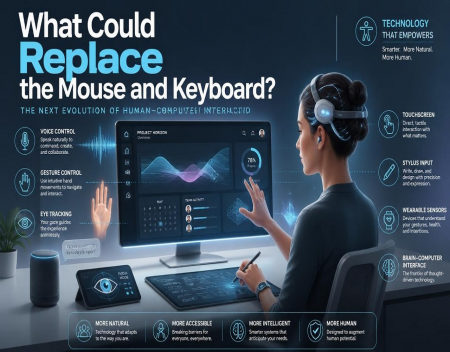
For decades, the mouse and keyboard have been the primary tools people use to interact with computers. From desktop PCs and laptops to workplace workstations and gaming systems, these familiar devices have remained remarkably consistent. Although they have become more comfortable, responsive, and technologically advanced, their basic design has changed very little.
However, computing technology is evolving. Artificial intelligence, voice recognition, gesture tracking, eye tracking, virtual reality, and wearable devices are creating new ways for people to communicate with computers.
As these technologies improve, the traditional mouse and keyboard may eventually become less important. Instead of physically typing commands and moving a cursor, people could interact with computers using speech, gestures, eye movements, or even signals from their brains.
But what technologies could realistically replace the mouse and keyboard, and how might they change the way we use computers?
Voice Commands and Artificial IntelligenceOne of the most obvious alternatives to traditional computer controls is voice interaction.
Voice assistants have already become common on smartphones, smart speakers, and other connected devices. Users can ask questions, set reminders, control smart home equipment, and perform basic tasks simply by speaking.
Artificial intelligence could make voice control considerably more powerful.
Instead of memorizing commands or navigating complicated menus, users might simply describe what they want to accomplish. An AI assistant could open applications, create documents, organize files, search databases, write computer code, and manage complicated workflows.
For example, someone preparing a business presentation could ask an AI assistant to create slides using information from several documents. Rather than manually opening files, copying information, and formatting each slide, the user could explain the desired result and allow the computer to handle much of the work.
Voice interaction will not replace typing in every situation. Writing lengthy documents, programming, and working in noisy environments may still be easier with physical controls. However, AI-powered voice interfaces could eliminate many everyday mouse and keyboard interactions.
Gesture ControlAnother possible replacement involves controlling computers through hand and body movements.
Gesture recognition technology uses cameras, sensors, and software to identify movements and translate them into commands.
For example, a user might move a hand to scroll through a document, make a pinching motion to select an object, or wave to move between applications.
Some gesture-based systems already exist in gaming, virtual reality, and specialized computing environments. As sensors become smaller and more accurate, these technologies could become more practical for everyday use.
Imagine sitting at a computer and manipulating a three-dimensional object by moving your hands through the air. Architects could rotate building models, designers could reshape virtual objects, and engineers could examine complex machinery without touching a physical controller.
However, gesture control has limitations. Holding your arms in the air for extended periods can become tiring, and small movements may be difficult for cameras to interpret accurately.
For gesture technology to become a mainstream replacement, it will need to be reliable, comfortable, and easy to use.
Eye Tracking TechnologyEye tracking is another technology that could change how people interact with computers.
Specialized cameras and sensors can detect where a person is looking and use that information to control a cursor or select objects on a screen.
Instead of moving a mouse, users could look directly at an icon, button, or menu item. A separate action, such as blinking, pressing a physical button, or using a voice command, could confirm the selection.
Eye tracking is particularly interesting for accessibility. People with limited physical mobility may be able to operate computers using only their eyes.
It could also become useful in virtual and augmented reality systems. Rather than requiring users to point at everything, a headset could recognize what they are looking at and adjust the interface accordingly.
However, eye tracking needs to be extremely accurate. Simply looking at something does not always mean someone wants to select it. Future systems will need reliable ways to distinguish between attention and intention.
Brain-Computer InterfacesPerhaps the most futuristic possibility is the brain-computer interface, commonly known as a BCI.
These systems are designed to interpret signals from the brain and translate them into commands that computers can understand.
Some brain-computer interface technologies are already being developed for medical applications. They aim to help people with paralysis communicate, operate digital devices, or control assistive equipment.
In the future, more advanced systems could allow people to interact with computers without using their hands, voices, or eyes.
Imagine selecting an application, moving a cursor, or controlling a digital object through neural signals. Such technology could eventually provide a completely different way of interacting with computers.
However, significant challenges remain. Researchers must improve accuracy, reliability, safety, and ease of use. Some systems require specialized equipment or surgical implants, while non-invasive approaches generally face different limitations in interpreting brain activity.
It is unlikely that brain-computer interfaces will replace ordinary keyboards and mice for most consumers in the immediate future. Nevertheless, they could become important in specialized environments and accessibility applications.
Virtual Reality and Spatial ComputingVirtual reality and spatial computing could also reduce the need for traditional computer controls.
In a conventional desktop environment, users interact with windows, icons, and menus displayed on a flat screen. Spatial computing allows digital objects and interfaces to exist within a three-dimensional environment.
Using a headset, someone might create several virtual monitors that appear to float around their workspace. They could move windows, resize applications, and manipulate objects using hand gestures, eye movements, or voice commands.
This could be particularly useful for people who need large digital workspaces but do not want multiple physical monitors.
Designers could work with three-dimensional models, engineers could examine virtual prototypes, and office workers could arrange documents and applications around them.
Some systems already combine eye tracking, hand tracking, and voice control to provide more natural interactions.
However, headsets must become lighter, more comfortable, and more affordable before this approach can replace traditional desktop setups for everyday work.
Touchscreens and Haptic TechnologyTouchscreens have already replaced physical keyboards and mice in many situations, particularly on smartphones and tablets.
They allow users to interact directly with digital objects rather than relying on a separate pointing device.
Future touch technology could become more sophisticated through haptic feedback. Haptic systems use vibrations, pressure, or other physical sensations to simulate the feeling of interacting with buttons and objects.
Some experimental technologies aim to create the sensation of touching virtual objects without requiring a conventional physical surface.
This could make virtual interfaces easier to use because people would receive physical feedback when selecting or manipulating digital elements.
However, touchscreens are not ideal for every task. Typing long documents on a flat display can be uncomfortable, and users often prefer physical keyboards for accuracy and speed.
Will the Keyboard and Mouse Actually Disappear?Despite all these developments, the mouse and keyboard are unlikely to disappear completely.
Physical keyboards remain extremely effective for writing, programming, data entry, and many professional tasks. A mouse provides precise control that is difficult to reproduce with gestures or voice commands.
Gamers, graphic designers, video editors, and office workers may continue to prefer traditional input devices for certain activities.
The more likely future is a combination of technologies.
A person might use voice commands to launch applications, eye tracking to select objects, gestures to manipulate three-dimensional models, and a physical keyboard to write detailed documents.
Artificial intelligence could coordinate these different input methods, allowing users to switch between them depending on the task.
Traditional devices may also become smaller, wireless, and more specialized rather than disappearing altogether.
Final ThoughtsThe mouse and keyboard have served as the foundation of personal computing for decades, but they may eventually become just two options among many ways to interact with technology.
Voice-controlled AI assistants, gesture recognition, eye tracking, virtual reality, spatial computing, and brain-computer interfaces all offer possibilities for making computers more natural and accessible.
Some of these technologies are already being used, while others remain in the early stages of development.
The biggest change may not be the replacement of one device with another. It could be the development of computers that understand what people want to accomplish without requiring them to learn complicated controls.
The future of computing may involve less time clicking buttons and typing commands, and more time communicating naturally with intelligent machines. The mouse and keyboard may not disappear, but the way we interact with computers could become almost unrecognizable compared with today's desktop experience.
Great experience with Computer Geek. They helped with my website needs and were professional, respon . . . [MORE].

Great, quick service when my laptop went into meltdown and also needed Windows 11 installed. Also ca . . . [MORE].
It was a great experience to working with you. thank you so much. . . . [MORE].
Thank you so much for great service and over all experience is good . highly recommended for all peo . . . [MORE].
We engaged The Computer Geeks in mid-2023 as they have a reputation for API integration within the T . . . [MORE].
What Could Replace the Mo

The Future of Smart Glass

The Next Evolution of Soc


