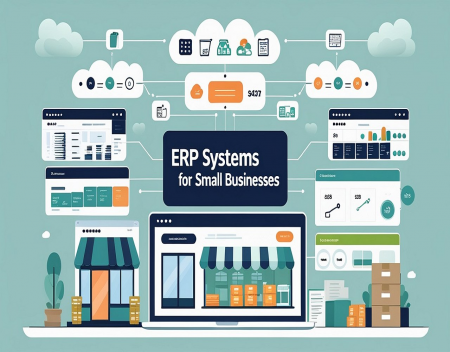
Running a small business often means wearing many hats. One person may handle sales, another manages inventory, someone else handles accounting, and customer information may be stored in a completely different system. As a business grows, keeping all of these systems organized can become increasingly difficult.
This is where an ERP system can help.
ERP stands for Enterprise Resource Planning. ERP software brings many of the important functions of a business together into one centralized system. Instead of relying on separate programs for accounting, inventory, sales, purchasing, customer information, and reporting, an ERP system can connect these functions and allow them to share information.
While ERP systems were once primarily associated with large corporations, modern ERP software is increasingly available to small and medium-sized businesses. The right system can improve efficiency, reduce errors, and give business owners a much clearer picture of how their company is performing.
What Is an ERP System?An ERP system is a type of business management software designed to connect different parts of an organization.
For example, when a customer places an order, an ERP system might automatically update the sales records, reduce the available inventory, create an invoice, and record the transaction for accounting purposes.
Without an integrated system, employees may need to enter the same information into several different programs. This creates additional work and increases the possibility of mistakes.
The main idea behind ERP software is simple: business information should be connected rather than scattered across multiple systems.
What Can an ERP System Manage?The exact features vary between ERP products, but many systems can manage several important areas of a business.
Accounting and Financial ManagementAccounting is one of the most common components of ERP software. Businesses can use ERP systems to track income, expenses, invoices, payments, taxes, and other financial information.
Having financial information connected to other parts of the business can make reporting much easier. Management can see how sales, expenses, inventory, and other activities are affecting the company's financial position.
Inventory ManagementFor businesses that sell physical products, inventory management can be extremely important.
An ERP system can track how many products are available, where they are stored, how quickly they are selling, and when additional inventory may need to be ordered.
Better inventory management can help prevent both shortages and excessive stock.
Sales and Customer ManagementERP systems can also connect sales information with customer records.
Employees may be able to see previous orders, invoices, customer information, and other relevant details from one location. This can make it easier for employees to understand a customer's history and provide better service.
PurchasingERP software can help businesses manage suppliers and purchasing.
For example, the system can keep track of suppliers, purchase orders, costs, and incoming inventory. This can make it easier to determine when products or materials need to be reordered.
Human ResourcesSome ERP systems include human resources features as well. Depending on the software, these may include employee records, payroll, time tracking, vacation information, and other employee-related functions.
Small businesses may not need every HR feature, but having these functions available can become useful as the company grows.
Why Would a Small Business Need ERP Software?One of the biggest advantages of ERP software is that it can reduce duplicated work.
Imagine a company receives an order. Without an integrated system, an employee might enter the order into a sales program, update inventory separately, create an invoice in accounting software, and then update another spreadsheet for management reporting.
With an ERP system, much of this information can be connected.
The order can automatically affect inventory and accounting records, while management can access updated information through reports and dashboards.
This can save employees time and reduce data-entry mistakes.
ERP Systems Can Improve Business VisibilityOne of the most valuable benefits of an ERP system is the ability to see what is happening across the entire business.
A business owner may be able to see current sales, outstanding invoices, inventory levels, expenses, purchasing activity, and other important information from a central dashboard.
This can help with decision-making.
Instead of relying on outdated spreadsheets or waiting for employees to compile reports, management can often access current information directly from the ERP system.
Better information can lead to better decisions.
Cloud-Based ERP SystemsModern ERP systems are increasingly cloud-based.
With cloud ERP, the software and business data are hosted on remote servers rather than being installed entirely on a company's own computers.
This can provide several advantages for small businesses. Employees may be able to access the system from different locations, updates can often be handled by the software provider, and the business may not need to purchase and maintain as much server hardware.
Cloud ERP can also make it easier for businesses with remote employees, multiple locations, or employees who travel.
However, businesses should still pay close attention to security, backups, user permissions, and the reliability of their internet connection.
ERP and Artificial IntelligenceArtificial intelligence is also becoming part of modern business software.
AI-powered ERP systems can potentially analyze business information, identify unusual activity, predict demand, automate repetitive tasks, and help create reports.
For example, an ERP system might analyze historical sales and suggest when inventory should be reordered. It could also identify unusual expenses or help management understand changing sales patterns.
AI will not replace the need for good business decisions, but it can make large amounts of business information easier to understand.
ERP Software Is Not Just for Large CompaniesThe word "enterprise" can make ERP sound like something designed only for large corporations. That is no longer necessarily the case.
Many ERP providers now offer products specifically designed for smaller organizations.
A small company may not need a massive system with hundreds of features. Instead, it may benefit from a simpler ERP platform that handles accounting, inventory, sales, purchasing, and reporting.
The important thing is to choose software that matches the size and complexity of the business.
The Cost of ERP SoftwareERP software can range from relatively affordable cloud subscriptions to expensive enterprise-level systems.
The total cost can include software subscriptions, implementation, customization, employee training, data migration, support, and integrations with other systems.
Small businesses should be careful not to purchase a system simply because it has a huge list of features.
More features do not automatically mean a better solution.
A smaller ERP system that employees actually use effectively can be much more valuable than a complicated system that nobody fully understands.
ERP Implementation Can Be ChallengingInstalling ERP software is not always a simple process.
A business may need to transfer information from existing accounting programs, spreadsheets, databases, and other systems. Employees may also need training.
There can be a learning curve, especially if employees have been using the same systems for many years.
Businesses should therefore plan an ERP implementation carefully. It can be useful to start with the most important functions rather than attempting to change every business process at once.
Choosing the Right ERP SystemBefore selecting an ERP system, a small business should identify its actual needs.
Consider questions such as:
It is also important to consider ease of use. An ERP system should make the business more efficient, not create unnecessary complexity.
The Future of ERP for Small BusinessesERP software is likely to become increasingly accessible to smaller businesses.
Cloud computing has already reduced some of the hardware and infrastructure requirements associated with traditional business software. Artificial intelligence is making ERP systems more capable, while automation is reducing the amount of manual work employees need to perform.
In the future, small businesses may be able to use intelligent ERP systems that automatically analyze sales, manage inventory, identify financial trends, communicate with customers, and provide business recommendations.
The goal will not simply be to store business information. ERP systems will increasingly help businesses understand that information and act on it.
Final ThoughtsERP systems can provide small businesses with something that becomes increasingly difficult to maintain as they grow: a single, connected view of the business.
By bringing accounting, sales, inventory, purchasing, customer information, and reporting together, ERP software can reduce duplicated work and improve the accuracy of business information.
However, ERP software is not automatically the right solution for every small business. The system needs to match the company's size, budget, employees, and business processes.
For a growing company that has outgrown spreadsheets and disconnected software, an ERP system could be the next major step toward becoming more organized, efficient, and prepared for the future.
Great experience with Computer Geek. They helped with my website needs and were professional, respon . . . [MORE].

Great, quick service when my laptop went into meltdown and also needed Windows 11 installed. Also ca . . . [MORE].
It was a great experience to working with you. thank you so much. . . . [MORE].
Thank you so much for great service and over all experience is good . highly recommended for all peo . . . [MORE].
We engaged The Computer Geeks in mid-2023 as they have a reputation for API integration within the T . . . [MORE].
The Browser Wars Revisite

The Rise and Fall of Flas
The History of the Intern