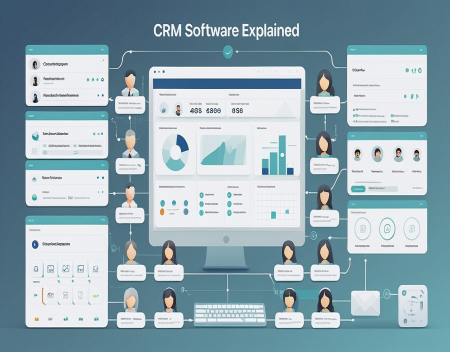
Businesses rely on relationships. Whether a company has ten customers or ten thousand, keeping track of those relationships can become difficult as the business grows.
Customer names, phone numbers, email addresses, sales opportunities, previous purchases, support requests, appointments, and conversations can quickly become scattered across spreadsheets, email accounts, notebooks, and different computer systems.
This is where CRM software comes in.
CRM stands for Customer Relationship Management. CRM software is designed to help businesses organize customer information, manage sales, track communications, improve customer service, and build stronger relationships with customers.
Modern CRM systems have evolved far beyond simple contact databases. Many now include automation, artificial intelligence, marketing tools, sales forecasting, customer support, reporting, and integrations with other business software.
What Does CRM Software Do?At its most basic level, CRM software provides a centralized database for customer information.
Instead of keeping customer information in multiple locations, a business can store it in one system.
A customer record might include their name, company, phone number, email address, previous purchases, sales activity, support requests, and notes from conversations.
Employees with the appropriate permissions can access the information they need without having to search through dozens of emails or files.
This gives everyone in the organization a clearer picture of the customer relationship.
Managing LeadsOne of the most important functions of CRM software is managing leads.
A lead is a potential customer who has shown some level of interest in a company's products or services.
For example, someone might fill out a website contact form, request a quote, call the company, or sign up for an email newsletter.
A CRM can record the lead and track what happens afterward.
Sales representatives can see which leads are new, which have been contacted, which are considering an offer, and which have become customers.
This helps prevent potential sales opportunities from being forgotten.
Managing the Sales ProcessCRM systems can also help businesses manage their sales pipelines.
A sales pipeline represents the different stages a potential customer goes through before making a purchase.
A typical pipeline might include stages such as:
CRM software can display these opportunities visually, making it easier for sales teams to understand what is happening.
Managers can also see how many potential deals are in the pipeline and estimate future sales.
Keeping Track of Customer CommunicationA CRM can keep track of interactions between a business and its customers.
Depending on the system and its integrations, this may include emails, phone calls, meetings, support requests, notes, and other activities.
This can be extremely useful when multiple employees deal with the same customer.
Instead of asking a customer to explain their situation again, an employee can review the customer's history.
This creates a more consistent customer experience.
CRM and Customer ServiceCRM software isn't only for sales departments.
Customer service teams can use CRM systems to manage support requests and customer problems.
A support representative can view the customer's account, previous purchases, previous support requests, and other relevant information.
Some CRM systems include ticketing systems that allow businesses to track customer issues from the moment they are reported until they are resolved.
This can improve response times and make it easier to identify recurring problems.
Marketing AutomationMany modern CRM platforms include marketing tools as well.
Businesses can use CRM data to create targeted marketing campaigns.
For example, a company could send different messages to new customers, long-term customers, inactive customers, and potential customers who have not yet made a purchase.
Marketing automation can also trigger actions based on customer behaviour.
Someone who downloads a product guide might automatically receive a follow-up email. A customer who hasn't purchased anything for a year might receive a special offer.
The goal is to make marketing more relevant while reducing the amount of manual work required.
CRM Reporting and AnalyticsA major advantage of CRM software is the ability to turn customer information into useful reports.
Managers can examine sales numbers, conversion rates, customer activity, revenue, and other measurements.
For example, a business might discover that most of its sales come from a particular type of customer.
It could also discover that potential customers are frequently abandoning the sales process at a particular stage.
This information can help management make better decisions.
Artificial Intelligence and CRMArtificial intelligence is becoming increasingly important in CRM software.
AI can analyze customer information and identify patterns that might otherwise be difficult to notice.
It can help sales representatives determine which leads are more likely to become customers.
AI can also summarize customer conversations, write follow-up emails, suggest responses, and identify important information from large amounts of data.
Some systems can even predict which customers may be at risk of leaving.
These capabilities can allow employees to spend less time managing information and more time interacting with customers.
Cloud-Based CRMMost modern CRM systems are cloud-based.
Instead of installing the software on a company's own servers, the CRM is hosted by a service provider and accessed through the internet.
This makes it possible for employees to access the system from offices, homes, laptops, tablets, and smartphones.
Cloud-based CRM systems also make it easier for businesses to add users as they grow.
Software updates and maintenance are generally handled by the provider.
However, businesses still need to carefully consider security, privacy, data ownership, and backup policies when choosing a cloud CRM.
CRM IntegrationsA CRM becomes much more useful when it can communicate with other business systems.
CRM software can often integrate with email platforms, accounting systems, websites, online stores, calendars, marketing platforms, telephone systems, and customer support software.
For example, an online store might automatically send customer purchase information to the CRM.
An accounting system could provide information about invoices and payments.
A website could automatically create a CRM lead whenever someone submits a contact form.
These integrations reduce the amount of manual data entry required.
CRM for Small BusinessesCRM software isn't only for large corporations.
Small businesses can benefit significantly from having a centralized customer database.
A small company might start with a basic CRM containing customer information, sales opportunities, and communication history.
As the company grows, it can add automation, marketing, reporting, and other features.
For small businesses, the key is choosing software that is powerful enough to be useful without being unnecessarily complicated.
A CRM that employees refuse to use provides very little value.
Choosing the Right CRMThere are hundreds of CRM systems available, and they are not all designed for the same type of business.
Before choosing one, a company should consider what it actually needs.
Important questions include:
Businesses should also consider how easy the system is to use.
A complicated CRM with dozens of features may sound impressive, but a simpler system that employees actually use can be much more valuable.
CRM SecurityBecause CRM systems contain sensitive customer information, security is extremely important.
A CRM may contain names, addresses, phone numbers, email addresses, purchasing history, business information, and potentially other sensitive data.
Companies should use strong passwords, multi-factor authentication, appropriate user permissions, encryption, and other security measures.
Employees should also receive training about phishing and other threats.
A CRM should be treated as an important business system, not simply as an online address book.
The Future of CRM SoftwareCRM systems are likely to become increasingly intelligent.
Artificial intelligence will continue to automate routine tasks and provide businesses with more detailed insights into customer behaviour.
Instead of simply recording what happened, future CRM systems may increasingly predict what is likely to happen next.
A system might recommend which customer a salesperson should contact, suggest the best time to make contact, or automatically prepare a personalized message.
CRM systems may also become more deeply integrated with other business applications, creating a single digital environment where employees can manage much of their daily work.
Final ThoughtsCRM software has become an important tool for businesses that want to manage customer relationships effectively.
At its core, a CRM provides a centralized place to store customer information and track interactions. Modern systems go much further, offering sales management, customer support, marketing automation, analytics, integrations, and artificial intelligence.
The biggest benefit isn't simply having more customer data. It is being able to use that information effectively.
A good CRM helps businesses understand their customers, avoid missed opportunities, improve communication, and make better decisions.
For a growing business, CRM software can transform customer information from a collection of scattered records into one of its most valuable business resources.
Great experience with Computer Geek. They helped with my website needs and were professional, respon . . . [MORE].

Great, quick service when my laptop went into meltdown and also needed Windows 11 installed. Also ca . . . [MORE].
It was a great experience to working with you. thank you so much. . . . [MORE].
Thank you so much for great service and over all experience is good . highly recommended for all peo . . . [MORE].
We engaged The Computer Geeks in mid-2023 as they have a reputation for API integration within the T . . . [MORE].

The Rise and Fall of Flas
The History of the Intern
The Evolution of Personal