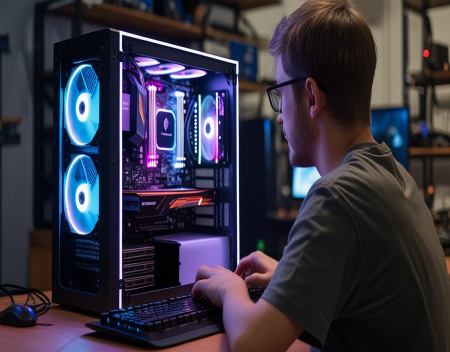
For many people, buying a computer means walking into a store or ordering one online that is ready to use right out of the box. However, there is another option that has become increasingly popular over the years—building your own PC. While assembling a computer from individual components may sound intimidating, it has never been easier thanks to improved hardware compatibility, detailed online tutorials, and user-friendly components. But is building your own PC actually worth the time and effort?
The answer depends on your needs, your budget, and how comfortable you are working with technology.
One of the biggest advantages of building your own computer is complete customization. Instead of accepting the specifications offered by a manufacturer, you get to choose every component yourself. This includes the processor (CPU), graphics card (GPU), motherboard, memory (RAM), storage drives, power supply, cooling system, case, and even the lighting and overall appearance.
This allows you to build a system that perfectly matches your intended use. If you're a gamer, you can prioritize a powerful graphics card. If you're a video editor, you may invest more in a multi-core processor and additional RAM. If you simply need a reliable office computer, you can save money by selecting modest components without paying for unnecessary features.
Another major benefit is performance for your budget. Pre-built computers often include hidden compromises to keep prices competitive. A manufacturer might advertise a powerful processor but pair it with slow memory, a basic motherboard, or a low-quality power supply. These cost-saving measures aren't always obvious to buyers.
When building your own PC, you control where your money goes. You can choose high-quality components throughout the system rather than accepting whatever parts were selected by the manufacturer.
Upgradeability is another important advantage. Many pre-built computers use proprietary cases, power supplies, or motherboards that make future upgrades difficult or impossible. A custom-built computer generally uses industry-standard components, allowing you to replace or upgrade individual parts as your needs change.
For example, you may decide to install a faster graphics card two years from now, double your RAM, or add another SSD without replacing the entire computer. This flexibility can significantly extend the lifespan of your investment.
Building a PC is also an excellent educational experience. During the assembly process, you gain a much better understanding of how computers work. You learn how processors communicate with memory, how cooling systems operate, how storage devices connect, and how each component contributes to overall performance.
This knowledge often makes future troubleshooting and maintenance much easier.
Many people are surprised by how straightforward modern PC assembly has become. Components are designed to fit together in only one way, connectors are clearly labelled, and today's motherboards include detailed instructions. There are also thousands of step-by-step videos available online that guide first-time builders through every stage of the process.
That said, building a PC isn't completely without challenges.
Selecting compatible components requires careful research. The processor must fit the motherboard socket, the memory must be supported by the motherboard, the power supply must provide sufficient wattage, and the case must be large enough to accommodate the graphics card and cooling system.
Fortunately, numerous online compatibility tools make this process much easier by identifying potential conflicts before you purchase any parts.
Another consideration is warranty support. With a pre-built computer, you generally receive a single warranty covering the entire system. If something goes wrong, you contact one company for service.
When you build your own PC, each component carries its own individual warranty. If a problem develops, you'll need to determine which part has failed and contact the appropriate manufacturer. While this provides flexibility, it can also require additional troubleshooting.
Time is another factor. Building a computer for the first time may take several hours, especially if you're carefully following instructions. Installing Windows, updating drivers, configuring the BIOS, and testing the system all require additional time before the computer is ready for everyday use.
For experienced builders, however, assembling a complete system often takes less than two hours.
Cost savings have traditionally been one of the biggest reasons to build a PC, although the situation has changed somewhat in recent years. Large computer manufacturers often receive discounts on components because they purchase them in enormous quantities. During promotional sales, some pre-built systems can actually cost less than buying all the individual parts separately.
However, custom builders still benefit by avoiding unwanted software, unnecessary subscriptions, and lower-quality components that sometimes accompany budget pre-built systems.
Gamers continue to be among the biggest supporters of custom-built PCs. Building your own system allows you to maximize gaming performance while selecting exactly the graphics card, processor, cooling system, and storage configuration you want. You also gain greater flexibility to upgrade future graphics cards as new games become more demanding.
Content creators also benefit from custom systems. Video editors, photographers, graphic designers, music producers, and 3D artists often require specialized hardware configurations that are easier to achieve through custom builds than off-the-shelf computers.
Reliability largely depends on the quality of the components you choose. Investing in a reputable power supply, quality motherboard, efficient cooling system, and well-designed case often results in a system that remains dependable for many years. Skimping on critical components to save a small amount of money can lead to stability problems or premature hardware failures.
Modern processors and graphics cards also include sophisticated power management and temperature monitoring systems that make today's custom-built computers safer and more reliable than ever before.
Artificial intelligence is beginning to influence PC building as well. New processors and graphics cards increasingly include dedicated AI acceleration hardware designed to improve performance for machine learning, image generation, video enhancement, language processing, and AI-assisted productivity applications. If you're building a computer today, considering AI capabilities may help ensure your system remains capable of handling tomorrow's software.
One overlooked advantage of building your own PC is satisfaction. There is something uniquely rewarding about pressing the power button for the first time and watching a computer you assembled yourself come to life. Many enthusiasts describe it as both a hobby and a valuable learning experience.
Of course, building a computer isn't the right choice for everyone. If you need a system immediately, don't enjoy working with hardware, or prefer the convenience of a single warranty and technical support, a quality pre-built computer remains an excellent option.
However, if you're willing to invest a little time learning about computer components, building your own PC offers outstanding flexibility, upgradeability, and personalization. You gain complete control over your hardware, avoid unnecessary compromises, and create a system tailored specifically to your needs.
Ultimately, building your own PC is about more than just saving money. It's about understanding your technology, choosing quality components, and creating a computer that fits your work, hobbies, and future upgrade plans. For many users, that combination makes building a PC not only worthwhile—but one of the most rewarding technology projects they will ever undertake.
Great experience with Computer Geek. They helped with my website needs and were professional, respon . . . [MORE].

Great, quick service when my laptop went into meltdown and also needed Windows 11 installed. Also ca . . . [MORE].
It was a great experience to working with you. thank you so much. . . . [MORE].
Thank you so much for great service and over all experience is good . highly recommended for all peo . . . [MORE].
We engaged The Computer Geeks in mid-2023 as they have a reputation for API integration within the T . . . [MORE].

The Hidden Cost of Free A

The Psychology of Notific
Why Subscription Services